

Public Bid Software Built for Construction

Construction companies that bid public work juggle dozens of agency websites, tight deadlines, and ever-changing bid documents just to find new bid opportunities. VendorLine brings public construction opportunities from cities, counties, school districts, and utilities into one central place, then alerts you when new solicitations match your trades, so you can spend less of your time searching and more of it bidding on the work you know best.

Built by PlanetBids, the procurement platform trusted by public agencies to create and publicly post solicitations, VendorLine helps contractors of every size find and pursue public work. 

Over 4,600 public construction bids from 392 PlanetBids agencies in the past year

How We Help

VendorLine gives construction companies a single, centralized location to find and evaluate solicitations. Whether you’re a one-person specialty shop or a general contractor with a full estimating team, we’ve got you covered.

With VendorLine, construction companies can: 

  • Create one login and see every agency that posts their solicitations on PlanetBids.

  • Track up to 30 keywords plus unlimited category codes.

  • See which other companies have pulled the plans on solicitations before you decide to chase a job.

  • Get AI-assisted details like bonding, insurance, and termination terms in PlanetBids bid documents. 

three engineers talking

How We’re Different

VendorLine is built by PlanetBids, the eProcurement platform public agencies use to write and post solicitations, accept bids, and award contracts. That means you see opportunities right as agencies publish them, with the same documents and dates.

Most bid tools stop at listing the opportunity. VendorLine is built for the contractor, narrowing hundreds of postings down to the few jobs that fit your trade so you can prepare for the right bid.

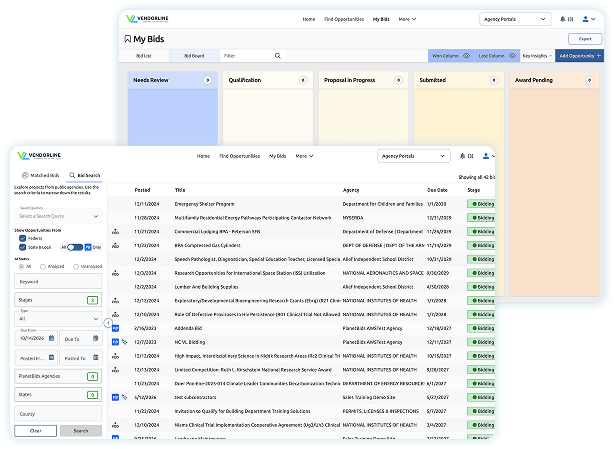
My Bids Preview
My Bids Preview

How VendorLine Compares to Plan Rooms and Lead Services

Many contractors still find public work the manual way, bookmarking agency portals and hearing about jobs secondhand. Generic bid sites help, but they often bury construction work in unrelated listings or charge thousands of dollars to see the same work you can find for free.

VendorLine gives contractors: 

  • Every PlanetBids agency bid, without a separate vendor profile for each

  • Planholder lists, so subs can find the primes bidding a job

  • A business directory of subcontractors so you can partner up to bid larger work

  • Bid results on PlanetBids agency RFPs, when agencies publish them, to study what competitors charged

The result: fewer missed jobs and less time sorting through listings outside your trade. 

man trying to login
man trying to login

The Public Construction Bid Process

Most public construction jobs follow the same path, from the agency advertising the work to the bid tabulation that names the low bidder. Most contractors still manage the bid finding process by hand, one portal at a time, and one missed step can get a bid thrown out. On PlanetBids, 6 in 10 construction opportunities get at least one addendum after they’re posted.

green envelope - icon

Advertisement

Get daily alerts when an agency posts a solicitation that matches your keywords and category codes.

green documents - icon

Plans & Planholders

Download the plans and specs and see which other contractors have pulled them.* 

green star - icon

Job Walks & Pre-Bid Meetings

Mandatory site visits show on your dashboard when you star a solicitation.

green bubble head question - icon

Addenda & Questions

Ask Pro Plus AI questions about the bid documents before you start pricing. 

green megaphone - icon

Subs & DBE Outreach

Post a sub-bid ad to registered subcontractors and download a good faith effort report for your bid.

green eye - icon

Bid Day & Results

Track the job on your bid board, then view results when the agency publishes them.

How PlanetBids helps

  • One Account

    One login and one dashboard to track every bid you’re watching, instead of visiting multiple portals.

  • Search by Territory

    Save search filters across local, state, and federal opportunities so each estimator can watch the territory they cover.

  • Bids Your Exchange Misses

    Catch the jobs posted only on an agency portal that never reach plan rooms or lead services.

  • Pre-registration

    Use your VendorLine profile to start preregistration with participating PlanetBids agencies in your area.

How PlanetBids helps

  • 30 Trade Keywords

    Load the terms your trade uses and get bids that match. 

  • Unlimited Category Codes

    Add every NIGP code that covers your work so nothing slips by.

  • See Why a Bid Matched

    Each match shows the keyword behind it. Remove a noisy keyword with one click.

  • Full Bid Search

    When a niche job is worded differently, search available open opportunities directly to find it.

How PlanetBids helps

  • Bonding Requirements

    Find out bid, performance, and payment bond requirements before you call your surety.

  • Insurance and Liability

    Pull insurance limits and indemnity language out of a long spec without reading every page.

  • Termination and Risk Terms

    Spot termination clauses and other risk terms that could change how you price the job.

  • Small Business Preferences

    Check whether small business or local preferences apply before you decide to bid.

How PlanetBids helps

  • Planholder Lists

    A typical PlanetBids construction bid draws nearly 30 interested bidders. See available prospective bidder information, so subs can identify general contractors pursuing a job.

  • Sub-Bid Ads

    Primes can reach registered vendors in the exact trades they still need to fill.

  • Business Directory

    Search a directory of registered businesses to find certified subs and suppliers.

How PlanetBids helps

  • Key Dates in One View

    See bid due dates, pre-bid meetings, and Q&A cutoffs together for every job you’re tracking.

  • Job Walk Reminders

    Listed mandatory job walks and pre-bid meetings stay visible on your dashboard for bids you’re tracking.

  • Bid Results

    When agencies publish bid tabulations, see who responded and what they charged.

  • Bid Board

    Track every job from interested to submitted to won or lost, in one easily accessible dashboard.

Top Problems We Solve

Too Many Agency Portals

Alerts That Fit Your Trade

Reading the Bid Package Available with Pro Plus AI on PlanetBids agency bids.

Primes, Subs and DBE Goals

Bid Day and After

Top Problems We Solve

How PlanetBids helps

  • One Account

    One login and one dashboard to track every bid you’re watching, instead of visiting multiple portals.

  • Search by Territory

    Save search filters across local, state, and federal opportunities so each estimator can watch the territory they cover.

  • Bids Your Exchange Misses

    Catch the jobs posted only on an agency portal that never reach plan rooms or lead services.

  • Pre-registration

    Use your VendorLine profile to start preregistration with participating PlanetBids agencies in your area.

How PlanetBids helps

  • 30 Trade Keywords

    Load the terms your trade uses and get bids that match. 

  • Unlimited Category Codes

    Add every NIGP code that covers your work so nothing slips by.

  • See Why a Bid Matched

    Each match shows the keyword behind it. Remove a noisy keyword with one click.

  • Full Bid Search

    When a niche job is worded differently, search available open opportunities directly to find it.

How PlanetBids helps

  • Bonding Requirements

    Find out bid, performance, and payment bond requirements before you call your surety.

  • Insurance and Liability

    Pull insurance limits and indemnity language out of a long spec without reading every page.

  • Termination and Risk Terms

    Spot termination clauses and other risk terms that could change how you price the job.

  • Small Business Preferences

    Check whether small business or local preferences apply before you decide to bid.

How PlanetBids helps

  • Planholder Lists

    A typical PlanetBids construction bid draws nearly 30 interested bidders. See available prospective bidder information, so subs can identify general contractors pursuing a job.

  • Sub-Bid Ads

    Primes can reach registered vendors in the exact trades they still need to fill.

  • Business Directory

    Search a directory of registered businesses to find certified subs and suppliers.

How PlanetBids helps

  • Key Dates in One View

    See bid due dates, pre-bid meetings, and Q&A cutoffs together for every job you’re tracking.

  • Job Walk Reminders

    Listed mandatory job walks and pre-bid meetings stay visible on your dashboard for bids you’re tracking.

  • Bid Results

    When agencies publish bid tabulations, see who responded and what they charged.

  • Bid Board

    Track every job from interested to submitted to won or lost, in one easily accessible dashboard.

How We Help Your Staff

VendorLine works for whoever owns the bid process at your company, large or small. Here’s who benefits and how.

man working on a cafe

Estimators & Bid Coordinators

  • Find matched public construction bid opportunities without daily portal checks
  • Review bonding, insurance, scope, and key terms with Pro Plus AI
  • Keep every pursuit organized from first look through bid day and final award 

woman on beige long sleeves

Owners & Principals

  • See your team’s entire public work pipeline in one place
  • Reduce manual bid discovery and agency registration work
  • Find subcontractors, suppliers, and teaming partners
man in front of a laptop holding a phone

Business Development & Preconstruction

  • Monitor priority counties, regions, and construction markets
  • Find PlanetBids opportunities your usual lead sources may miss
  • Identify potential prime contractors through available prospective bidder lists 

Top Questions We Get Asked

Can VendorLine find construction bids that match my trade and service area, without showing me irrelevant work?

small blue chevron arrow down icon

Yes. Build your bid matching profile around the work you perform using trade specific keywords and broad construction category codes. Then narrow active opportunities by filters such as local, state, or federal work. Start with buyer language such as “site grading,” “concrete foundation,” “demolition,” “electrical,” or “job order contracting,” rather than relying only on broad terms like “general contractor.”

Do I still need to register separately with every public agency?

small blue chevron arrow down icon

You may still need to complete agency specific requirements, but VendorLine can reduce repetitive registration work with PlanetBids agencies by reusing your core company information. It does not replace agency-specific prequalifications, annual renewals, certificates, questionnaires, or third-party systems.

Can I submit my construction bid directly through VendorLine?

small blue chevron arrow down icon

VendorLine helps you find, qualify, organize, and track opportunities, then directs you to the agency’s required submission method. For a PlanetBids agency bid, that may mean opening the related PlanetBids portal. Other agencies may require a different portal, email, or physical submission. Your team still prepares the estimate and bid package. Always follow the instructions in that solicitation.

Can VendorLine tell me whether I’m actually eligible before I spend hours reviewing plans and bid documents?

small blue chevron arrow down icon

Yes. VendorLine Pro Plus AI can help you make a faster go/no go decision by comparing an open opportunity to up to 10 previous bids that you upload to the system. You can also surface the scope, dates, matching terms, and, on PlanetBids agency bids, AI assisted document analysis by asking questions in plain English. Contractors should still verify licensing, bonding, insurance, prevailing wage, prequalification, and other compliance requirements in the source documents before bidding.

Can I use VendorLine to find subcontracting opportunities or connect with prime contractors?

small blue chevron arrow down icon

Yes. VendorLine includes a business directory and subcontractor and teaming tools designed to help primes and subcontractors find one another. This is especially useful when a specialty contractor wants to join a larger public works pursuit rather than bid as the prime. Directory results depend on which vendors have opted in and how complete their classifications, licenses, and location data are.

Can I see who else is pursuing a project, including competitors or potential prime partners?

small blue chevron arrow down icon

For many PlanetBids agency bids, VendorLine can surface prospective bidder information that is already public, helping you understand the competitive field and discover related opportunities. Visibility varies by agency and solicitation, so VendorLine cannot guarantee that every public bid source will show a complete bidder list.

Can I keep my construction pursuits organized from initial review through proposal, submission, award, or loss?

small blue chevron arrow down icon

Yes. The My Bids bid board lets your team move opportunities through stages such as review, qualification, proposal, submitted, won, and lost, while keeping bid deadlines, pre-bid meetings, and Q&A cutoffs visible. For PlanetBids agency bids, certain status changes can update automatically after submission. External opportunities may require manual updates.

Which states does VendorLine cover?

small blue chevron arrow down icon

VendorLine features open bidding opportunities in every region and every state, although some states and metropolitan areas do have more opportunities. Coverage is strongest in California, Texas, the Northeast, and Florida, and thousands of new projects are added every day. Check out our States & Regions Page for more info.

Get Started

See exactly how much public construction work matches your trade. Book a quick demo and we’ll build your keyword list and pull the open bids that fit your work, live on the call. You’ll also see how Pro Plus AI breaks down a real bid package from an agency in your area. Not ready to talk?

Register for VendorLine today and start searching on your own